
Customer Svc: 855-620-2330 -
M-Sat -9am-6pm
Speak To Customer Service - 855-620-2330 - M-Sat 9:00am - 6:00pm MST
Customer Svc: 855-620-2330 -
M-Sat -9am-6pm
Speak To Customer Service - 855-620-2330 - M-Sat 9:00am - 6:00pm MST

Last Updated: September 8, 2026
Choosing the best golf simulator for home practice comes down to matching your space, budget, and data needs with the right components. At Total Golf Simulators, we've helped homeowners convert garages and spare rooms into year-round practice bays, and a common mistake we see is buying a launch monitor first without planning the room around it.
Budgets for a complete home setup start around $4,000 and climb past $20,000 for commercial-grade installations, so getting the component mix right the first time saves money and frustration.
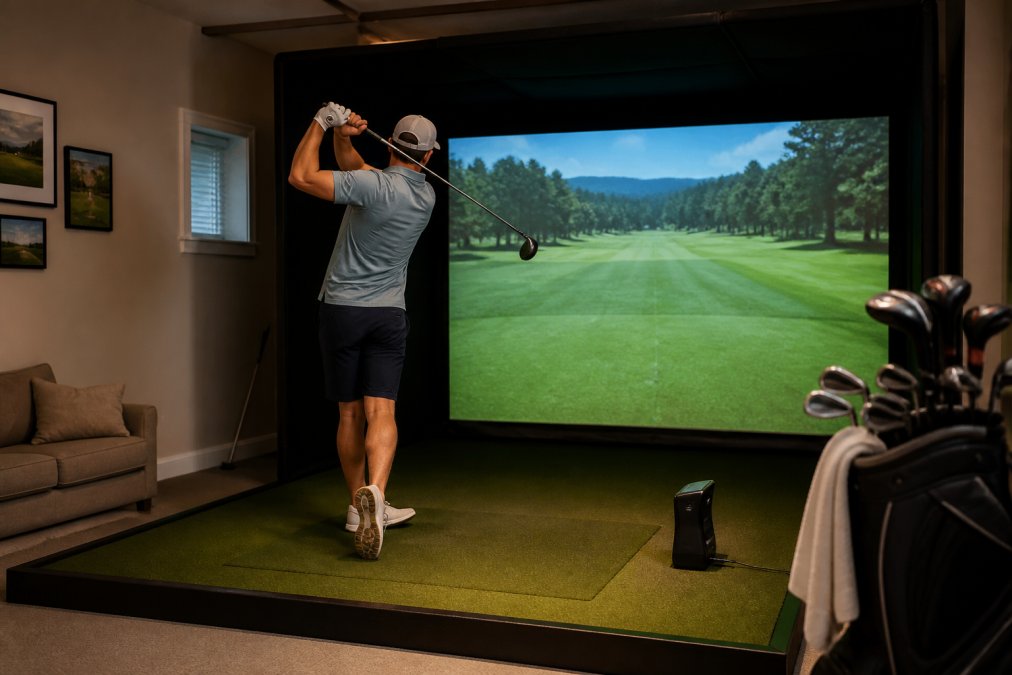
We evaluated simulators on four criteria: launch monitor accuracy, software ecosystem quality, enclosure durability, and ease of installation. Radar-based units like the Garmin Approach R10 track the ball through the air, while photometric systems like the Uneekor Eye Mini read the ball's dimples at impact for precise spin measurement.
For most home users, the ideal setup pairs a portable launch monitor with a quality enclosure and mat. Commercial users and serious instructors should prioritize overhead-mounted units with larger hitting zones and more data points.
| Component | Product | Starting Price | Best For |
|---|---|---|---|
| Launch Monitor | Garmin Approach R10 | $599.00 | Budget-conscious golfers, portability |
| Launch Monitor | Uneekor Eye Mini | $2,999.00 | Data-driven practice at home or range |
| Launch Monitor | Uneekor Eye XO2 | $10,999.00 | Serious instructors, commercial bays |
| Enclosure | DIY Golf Enclosure System | $1,349.00 | First-time builders on a budget |
| Enclosure | Vanish Series Retractable | $2,999.00 | Multi-purpose rooms needing flexibility |
| Enclosure | Carl's Place Pro Enclosure | $3,409.95 | Permanent, premium home installations |
| Hitting Mat | Country Club Elite | $173.20 | Compact practice, realistic feedback |
| Hitting Mat | TallTurf Real Tee Mat | $425.00 | Full-stance swings, real tee use |
| Projector | Optoma ZW350ST | $939.00 | Budget projector for tight spaces |
| Projector | BenQ LK936ST 4K | $4,899.00 | Premium 4K image quality |
Ceiling height is the single most important measurement for any home simulator. You need at least 9 feet of clearance to swing a driver comfortably, though 10 feet is the safe standard most golfers should target. The Uneekor Eye XO2 recommends a mounting height around 9-10 feet, meaning rooms with lower ceilings will force you into camera-based floor units instead.


Measure the actual swing, not the room. Stand on the exact spot where your hitting mat will sit, take your normal driver stance, and make a full swing. Have a partner mark the highest point your club reaches on the wall. Repeat this 10 times, most golfers find their swing arc varies by 2-4 inches. Add 6 inches of buffer to that maximum height for safety.
Depth requirements depend on your launch monitor type. Radar units like the Garmin R10 need roughly 8-10 feet between the unit and the screen to track ball flight accurately (support.garmin.com). Camera-based systems like the Uneekor Eye Mini sit beside the ball and require as little as 4-5 feet from ball to screen, making them better suited for tight basements or single-car garages. Overhead units like the Eye XO2 need enough depth for the ball to travel 10-14 feet before hitting the screen, plus 3-4 feet behind the ball for the golfer's backswing.
Width is often overlooked, and it's where most home installations fail. A standard enclosure like the Carl's Place Pro measures 8-10 feet across, but you need additional clearance on both sides for your swing arc and for the enclosure frame itself. For a right-handed golfer, the critical clearance is on the left side (your lead side), you need at least 3 feet of clear space from the center of the mat to any wall or obstruction to complete your backswing. Left-handed golfers need the same on the right. The total recommended footprint for a comfortable single-golfer bay is 10 feet wide by 15 feet deep by 9 feet 6 inches high.
Ceiling obstructions are the hidden killer. A 10-foot ceiling claim in a listing often means the center of the room only. Ductwork, ceiling fans, light fixtures, and garage door tracks routinely eat 6-12 inches of clearance. Garage door openers mounted on the ceiling are a frequent culprit, they hang 12-18 inches below the ceiling and sit directly above where most golfers place their mat. If your garage has an opener, budget for a side-mount opener (roughly $300-$500 installed) or plan your bay offset from the opener's location.
Flooring matters more than most guides admit. Concrete floors in garages transmit shock through your joints and can cause hip and knee strain over long practice sessions. A quality hitting mat like the TallTurf Real Tee Mat at $425.00 includes a foam base that absorbs impact, but you should also consider a 3/4-inch rubber stall mat (available at farm supply stores for roughly $50-$70) under the mat to protect the floor and add stability. If your space is above a living area, acoustic underlayment or a second layer of foam matting beneath your hitting area is essential.
Use this pre-purchase checklist before you measure anything:
The Garmin Approach R10 at $599.00 is the best entry point for home practice. It tracks more than a dozen metrics including club head speed, ball speed, spin, launch angle, and smash factor, and it records video clips with your stats overlaid on each shot. The R10 works indoors and outdoors, pairs with the Garmin Golf app for access to more than 42,000 virtual courses, and offers up to 10 hours of battery life. Its main limitation is accuracy with short chips and putts. simulator enclosure options.
Stepping up, the Uneekor Eye Mini at $2,999.00 delivers tour-level data in a portable form. Its Ball Optix technology reads the dimples on any standard golf ball, eliminating the need for marked balls, while Club Optix captures clubhead speed, path, angle of attack, and smash factor with visual snapshots at impact. The Eye Mini provides 19 data points without gating key metrics behind paywalls, and it works with GSPro, E6 Connect, and other third-party simulators (uneekor.com).
For serious instructors and commercial facilities, the Uneekor Eye XO2 at $10,999.00 is the gold standard. This overhead-mounted unit uses three high-speed photometric and infrared cameras to detect 24 data points, with a hitting zone of about 28 by 21 inches and a non-marking ball technology that works with any golf ball. The Eye XO2 includes real-time club data with reflective stickers, supports trouble mats for bunker and rough lies, and ships with a 3-month Ultimate software trial. It also carries a 2-year warranty including a limited strike warranty.
Building a home golf simulator follows a logical sequence: measure your space, choose your launch monitor, select your enclosure, pick your hitting surface, and finally add projection and software.
Start by confirming your ceiling height and swing clearance. Next, decide between a portable launch monitor like the Garmin R10 or a fixed unit like the Uneekor Eye Mini.
Your enclosure is the largest purchase and the one that transforms a room. The DIY Golf Enclosure System from All Sport Systems at $1,349.00 is the smart starting point for first-time builders, offering five sizes from 8x10x5 to 9x14x5 with multiple upgrade options including foam wedge inserts, baffle nets, and projector shields. For permanent installations, the Carl's Place Pro Enclosure at $3,409.95 adds a moveable crossbar for perfect launch monitor alignment, BlackStop fabric that darkens the interior for sharper images, and a one-piece wraparound ceiling and sidewall design that cuts installation time by nearly an hour.
Most guides ignore the environmental factors that determine whether your simulator feels like a professional practice facility or a frustrating toy. Noise is the first issue. A driver striking a ball at 100 mph generates a sharp crack that echoes in a bare garage or basement. Acoustic panels on the walls behind and beside the hitting area absorb this sound, and foam inserts inside your enclosure, like those included with the Carl's Place Pro, dampen the impact against the screen.

Noise mitigation goes beyond the hitting zone. The crack of impact is only part of the problem, the projector fan, PC cooling fans, and the thud of the ball hitting the screen all contribute. For residential areas or apartments, consider these specific measures:
Lighting directly affects launch monitor accuracy. Uneekor's Eye XO2 documentation notes that even, non-flickering lighting produces the most reliable reads, while very bright or reflective clubs, especially chrome wedges, can cause misreads. Avoid direct sunlight and install dimmable LED fixtures that cast uniform light across your hitting zone. Your projector also matters: a brighter unit like the BenQ LK936ST at $4,899.00 delivers 5,100 ANSI lumens and a 3,000,000:1 contrast ratio, which keeps images vivid even in partially lit rooms.
Lighting is a calibration tool, not just an aesthetic choice. Camera-based launch monitors like the Uneekor Eye Mini and Eye XO2 rely on consistent, flicker-free illumination to track ball dimples at high speed. Standard household LED bulbs operate at 120 Hz and can cause subtle flicker that degrades reads. Look for drivers rated for 25,000+ hours with a high color rendering index (CRI of 90+) and install them on a dimmer switch. Position lights directly above the hitting zone, angled slightly toward the ball, and avoid placing any light source behind the launch monitor where it creates a backlight condition. Your projector's light spill also matters, if the projector is mounted above and behind the hitting area, its beam can wash over the ball and interfere with camera-based tracking. Use a projector shield or mount the projector at a steeper angle to keep its light cone away from the hitting zone.
PC hardware is the most commonly underestimated component. Simulation software like GSPro and E6 Connect requires a gaming-grade computer with a dedicated graphics card, a modern multi-core processor, and at least 16GB of RAM (gsprogolf.com). The Uneekor Eye XO2 requires an Ethernet connection to your PC for stable data transfer, and the Eye Mini needs either a PC or iPad depending on your software choice. Budget $1,200 to $2,000 for a capable PC if you don't already own one.
Break down PC requirements by budget tier:
Maintenance and longevity, the gap every other guide ignores. A home simulator is a significant investment, and knowing what wears out and when will save you thousands over five years. The impact screen is your first wear item. A standard polyester screen subjected to daily driver practice will develop visible wear, thinning, pilling, or small tears, within 18-24 months. Carl's Place sells replacement screen material separately, and swapping it takes about 30 minutes with two people. The hitting mat is the second wear item. The Country Club Elite mat at $173.20 uses a layered turf system that holds up well, but the hitting strip area will compress and lose its shock absorption after roughly 10,000-15,000 shots. Rotate your mat 180 degrees every few months to distribute wear. Launch monitors require periodic calibration. Radar units like the Garmin R10 need their firmware updated regularly, and the unit's internal sensors can drift if exposed to extreme temperatures, so avoid leaving it in an unheated garage during winter. Projector bulbs are the hidden recurring cost: laser projectors like the BenQ LK936ST are rated for 20,000+ hours, but lamp-based projectors need replacement bulbs every 3,000-5,000 hours at $200-$400 each. Finally, check your enclosure's netting and zippers quarterly, the constant vibration from ball impact loosens zipper tracks and stretches netting, and catching a tear early prevents a ball from escaping at 150 mph.
Choosing the best golf simulator for home practice ultimately comes down to being honest about how you'll use the space. A golfer who wants casual winter practice with friends will be thrilled with a Garmin R10, a DIY enclosure, and a Country Club Elite mat. A player serious about lowering their handicap needs the data depth of an Uneekor Eye Mini or Eye XO2, a premium enclosure like the Carl's Place Pro, and a hitting mat like the TallTurf that accepts real tees and absorbs joint impact. A multi-purpose room demands the flexibility of the Vanish Series retractable enclosure.
The team at Total Golf Simulators carries the full range of launch monitors, enclosures, hitting mats, and projectors reviewed here, and our Simulator Finder Quiz matches your space and budget to a complete setup. Every purchase includes our Price Match Guarantee, free shipping on most items, and step-by-step guidance from initial measurement through final calibration. Get started with Total Golf Simulators and turn your unused space into a practice facility you'll actually use year-round.
Yes, golf simulators are an excellent practice tool. They provide instant feedback on ball speed, launch angle, spin rate, and club path, which is difficult to get at a driving range. The Uneekor Eye Mini offers 19 data points, letting you analyze every part of your swing. With consistent use, you can identify swing flaws and track improvement over time, making practice sessions more productive.
A golf simulator requires roughly 10 feet of width, 15 feet of depth, and 9 feet of ceiling height. For the best experience, the Uneekor Eye XO2 recommends a 9-10 foot ceiling. You'll need about 8-10 feet from the ball to the screen for the launch monitor to read your shot accurately. Measure your space carefully before purchasing equipment.
For most home practice setups, the Uneekor Eye Mini is the best launch monitor. It provides 19 data points including ball speed, club path, and spin rate at a $2,999 price point. The Garmin Approach R10 at $599 is a solid entry-level option for beginners, while the overhead Uneekor Eye XO2 at $10,999 suits serious golfers who want 24 data points and a large hitting zone.
A complete home golf simulator setup can cost anywhere from $2,000 for a basic system with the Garmin R10 and a DIY enclosure to over $15,000 for a premium setup with the Uneekor Eye XO2 and a Carl's Place Pro Enclosure. A mid-range system with the Uneekor Eye Mini and a quality enclosure typically lands around $7,000-$8,000.