
Customer Svc: 855-620-2330 -
M-Sat -9am-6pm
Speak To Customer Service - 855-620-2330 - M-Sat 9:00am - 6:00pm MST
Customer Svc: 855-620-2330 -
M-Sat -9am-6pm
Speak To Customer Service - 855-620-2330 - M-Sat 9:00am - 6:00pm MST

Last Updated: October 10, 2026
When considering golf simulator vs home theater room design, the decision between a dedicated golf simulator room and a combined space comes down to one fundamental question: do you want specialized performance or maximum flexibility? The answer depends entirely on how you use the space and what compromises you're willing to make.

A dedicated golf simulator room optimizes every element for launch monitor accuracy, ball containment, and swing mechanics. A combined space sacrifices some of that precision to give you a dual-purpose room that works for both golf practice and movie nights.
The core tension in golf simulator vs home theater room design: golf simulators demand specific conditions (ceiling height, screen placement, projector positioning, acoustic isolation) that conflict with home theater priorities (seating distance, image brightness, surround sound placement). When you try to serve both purposes in one room, you're making compromises in both.
Your room's physical dimensions determine what's actually possible. Before you choose between dedicated and combined, measure your space carefully. Many people discover mid-project that their ceiling is too low or their room too narrow for what they want to do.
You need at least 9 feet of ceiling height to swing a driver comfortably in a golf simulator. Most golfers need 10 feet to feel unrestricted. This is the single most common constraint that forces people toward a combined space, their basement has an 8-foot ceiling, and they convince themselves they'll adapt.
You won't adapt. A cramped swing affects your muscle memory and makes practice less valuable. If your ceiling is 9 feet or lower, a dedicated golf simulator room becomes impractical.
For a combined space, the lower ceiling is less problematic because you're not always swinging. You watch movies from a seated position, so 8 feet works fine. This is one area where the combined approach genuinely solves a real limitation.
The hitting area itself, the space from your feet to the screen, needs at least 5 feet of depth. Most setups use 6 to 8 feet to give you a full follow-through without feeling cramped.
A dedicated golf simulator room should be at least 12 feet wide and 15 feet deep. This gives you 180 square feet of usable space, which accommodates a hitting mat, the screen, and a small seating area behind you for observation or coaching.
A combined space can function in 12 by 12 feet, but you'll sacrifice comfort. The hitting area competes with seating depth and movie viewing distance. You end up with a room that's adequate for both purposes but optimized for neither.
If your room is smaller than 12 by 12 feet, a combined setup is your only realistic option. Accept that trade-off upfront rather than trying to force a dedicated simulator into a space that doesn't support it.
This is where the conflict between the two room types becomes concrete. Golf simulator screens and movie screens have opposite requirements.
A golf simulator impact screen must stop golf balls traveling at 160+ mph. It needs to be durable, forgiving on impact, and able to handle thousands of shots without degradation. The screen also needs to be acoustically transparent so sound from the launch monitor and golf simulator software can reach speakers positioned behind it.
A home theater projection screen prioritizes image quality. It's designed to reflect light evenly across its surface, minimize hot spots, and display colors accurately. It's typically made from vinyl or specialized fabric that's smooth and reflective.
These are fundamentally different products. An impact screen used for movies shows visible texture and uneven brightness. A theater screen used for golf practice degrades quickly under impact and doesn't contain balls effectively.
A perforated impact screen offers a compromise. It's durable enough for golf balls and acoustically transparent for sound, but the holes are visible on the projected image, especially on a large screen or in a bright room.
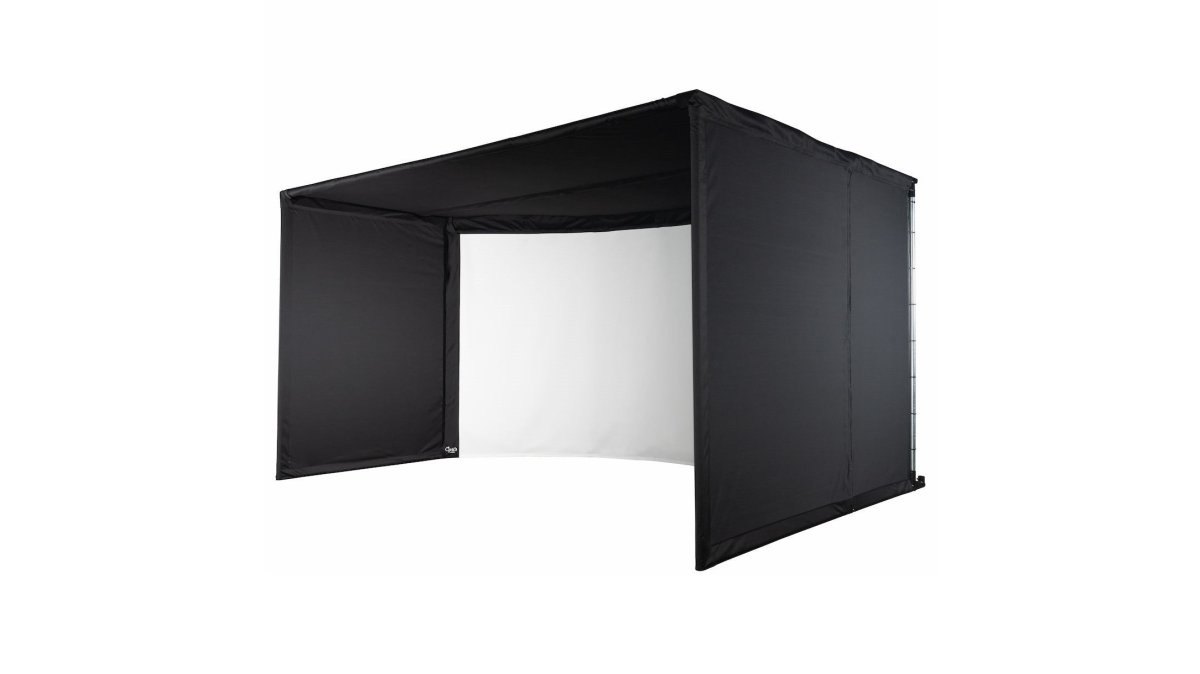
The Vanish Series Retractable Golf Enclosure solves the screen problem by using two different screens in one system. The rear impact screen handles golf balls, while a separate projection screen can be positioned in front for movies.

This approach works, but it adds complexity and cost. You're essentially buying two screens and a motorized retraction system. The Vanish Series starts at $2,999.00 and includes the impact screen, side enclosures, and ceiling panel, a complete enclosure system that transforms the room in seconds.
A motorized drop-down enclosure like the Remote Control Motorized Drop Down Golf Sim Enclosure ($2,650.00) offers similar flexibility with a different mechanism. The screen lowers when you're practicing golf and raises when you want an open room.
If you're not willing to invest in a retractable system, you're choosing a fixed compromise: one screen that works adequately for both purposes but optimally for neither.
Projector placement determines image quality, and the two room types have conflicting needs.
A golf simulator projector must be positioned to create a large, bright image on the screen from a relatively short distance.
A short-throw projector like the Optoma Golf Simulator Projector UHZ35ST projects a 100-inch image from just 4 feet away.
The Optoma delivers 4K UHD resolution (3840 x 2160) with 3,500 lumens brightness.
In a combined space, you face a conflict. For golf, you want a short-throw projector positioned high and forward.
If your seating is 10 feet from the screen but your projector is 4 feet from the screen, the image will be too large and bright for comfortable movie watching.
Vanish Series® Retractable Golf Enclosure →
A dedicated golf simulator room solves this by positioning the projector specifically for golf. A combined space requires compromise: either accept a suboptimal projector position for golf, or accept an oversized, overly bright image for movies.
This section reveals the practical friction between the two room types.
In a dedicated golf simulator room, seating is secondary. You have a chair or bench behind the golfer for coaching or observation, positioned 8 to 12 feet from the screen. This distance is too close for comfortable movie watching but perfect for golf instruction.
In a combined space, seating becomes the primary constraint. For movies, you need seating 1.5 to 2.5 times the screen width away. A 100-inch screen requires seating 12 to 17 feet back.
The Carl's Place Curved Enclosure Kit ($4,894.95) creates a panoramic viewing area that wraps around your peripheral vision. This curved design works well for golf because it keeps you immersed in the simulator experience.

Golf simulators need speakers positioned to deliver accurate audio feedback from the launch monitor and simulator software. These speakers typically sit behind or beside the screen, where they can be heard clearly during the swing.
Home theater requires surround sound: front speakers, side surrounds, and rear speakers positioned around the room. This creates an immersive audio field that works for movies but is overkill for golf.
In a combined space, speakers must be protected from golf balls. A ball traveling at 150+ mph will destroy an unprotected speaker.
The acoustic tiles from Carl's Place (Qty 25 at $279.00) help control sound in the room, but they don't solve the speaker protection problem. You still need to position speakers safely, which limits your audio options.
A dedicated golf simulator room solves this by positioning speakers specifically for golf audio. A combined space requires speaker placement that balances golf ball protection with movie surround sound, a compromise that leaves both purposes suboptimal.
The financial picture clarifies the trade-off. Here's what you're actually spending:
| Component | Dedicated Room | Combined Space |
|---|---|---|
| Enclosure | $2,650-$4,895 | $2,650-$4,895 |
| Projector | $2,349 | $2,349 |
| Acoustic Treatment | $279+ | $279+ |
| Retractable Screen System | None | $500-$1,500 |
| Seating (golf + movie) | $500-$1,000 | $1,500-$3,000 |
| Speaker System | Golf-focused ($500-$1,000) | Surround sound ($2,000-$4,000) |
| Estimated Total | $6,500-$9,000 | $9,500-$16,000 |
A combined space costs 30 to 50 percent more because you're buying two systems in one room. The retractable screen, dual seating arrangements, and surround sound system add significant cost.
A dedicated room is cheaper upfront, but you lose the flexibility to use the space for anything else. A combined space costs more but gives you dual functionality, if you value both golf practice and movie nights equally, the extra investment makes sense.
Ask yourself these three questions:
Do you have the ceiling height? If your ceiling is below 9 feet, a dedicated golf simulator room isn't practical. A combined space is your only option. If you have 10+ feet, both are possible.
How often will you actually use both activities? If you practice golf 3 times a week and watch movies once a month, a dedicated room is the smarter choice. If you use both regularly, the combined space justifies its extra cost.
What's your budget? A dedicated room costs $6,500 to $9,000 to build properly. A combined space costs $9,500 to $16,000. If you're below $10,000, a dedicated room is your only realistic option. If you have $15,000+, a combined space becomes viable.
Golf practice requires specific conditions that are hard to compromise on. A dedicated space gives you the best launch monitor accuracy, the most comfortable swing mechanics, and the most realistic simulator experience.
However, if your space is genuinely limited, a small basement, a garage conversion, or a spare bedroom, a combined space is better than no simulator at all. The Vanish Series Retractable Golf Enclosure ($2,999.00) is the best solution for combined spaces because it solves the screen problem.
The choice between a dedicated golf simulator room and a combined space isn't about which is objectively better. Total Golf Simulators can help you build either setup with equipment that performs at the highest level, explore our Simulator Finder Quiz to match the right enclosure, projector, and accessories to your specific space and goals. Golf simulator room design best practices and Home theater installation standards offer additional technical guidance if you want to dive deeper into room specifications.
Yes, but with trade-offs. Impact screens designed for golf simulators are perforated to allow light through and protect against ball impact, which can reduce image brightness and contrast for movies. A combined space requires either a retractable screen system (like the Vanish Series) that switches between golf and theater modes, or a compromise screen that performs adequately but not optimally for either use. For frequent movie watching, a dedicated home theater screen delivers superior image quality.
Most golfers require a minimum of 10 feet of ceiling height to accommodate a full swing without hitting the ceiling or enclosure. If your ceiling is 9 feet or lower, you'll need to compromise on swing mechanics.
Budget includes an enclosure ($2,650 to $4,895), projector ($2,349+), impact screen, acoustic treatment, and seating.
Position the hitting area at one end of the room with the impact screen mounted 8 to 12 inches from the rear wall. Place the projector 4 to 8 feet from the screen (depending on throw ratio) on the ceiling or rear wall bracket. Seating should be 8 to 12 feet back from the screen for optimal viewing angles for both golf and movies. Use a retractable enclosure to maximize floor space when not in use. Acoustic tiles on walls and ceiling reduce echo and ball noise while improving movie audio clarity.
Yes, but it requires strategic placement and barriers. Mount speakers high on walls or in ceiling corners, outside the ball flight path. Use the Vanish Series retractable enclosure with corner protection to contain off-center shots. Keep audio equipment and projectors behind the screen or in protected ceiling mounts. Acoustic tiles absorb impact noise and reduce ricochet risk.