
Customer Svc: 855-620-2330 -
M-Sat -9am-6pm
Speak To Customer Service - 855-620-2330 - M-Sat 9:00am - 6:00pm MST
Customer Svc: 855-620-2330 -
M-Sat -9am-6pm
Speak To Customer Service - 855-620-2330 - M-Sat 9:00am - 6:00pm MST

Last Updated: August 31, 2026
A commercial golf simulator turnkey solution is a complete, pre-integrated system designed to launch an indoor golf business without sourcing and assembling components separately. Every piece, launch monitor, enclosure, projector, hitting mat, and software, arrives configured to work together immediately upon installation.
The term "turnkey" means you turn the key and it works. No guessing whether your launch monitor will communicate with your projector or whether your enclosure dimensions match your space. The entire system has been engineered as a cohesive unit, tested for compatibility, and delivered with clear installation guidance.
At Total Golf Simulators, we've helped commercial venue operators understand that turnkey solutions eliminate the trial-and-error that derails DIY builds. A venue operator who assembles components individually faces weeks of troubleshooting. A venue operator who chooses a true turnkey solution is operational within days.
Commercial golf simulator turnkey solutions range from approximately $10,000 to $23,000 for complete, ready-to-play systems.
Entry-level turnkey solutions typically start around $10,000-$12,500 and include a mid-range launch monitor, standard enclosure, basic projector, and hitting mat. The Red Stakes Golf RSG Pro Simulator Package at $12,249.99 includes the RSG Pro launch monitor with dual-camera technology, an enclosure with impact screen, an HD projector, and hitting mat. The system ships with RSG Club software and lifetime access to 10 real-world courses with no annual subscription fees.
The ProTee VX Sim Package at $10,353.61 uses overhead infrared camera technology paired with a 4K laser projector and deluxe impact screen, appealing to venues that prioritize visual clarity.
Mid-range turnkey solutions ($15,000-$17,000) add professional-grade components and larger enclosures. The SimBooth Kit 1 at $15,495 and SimBooth Kit 2 at $16,495 feature a full booth-style enclosure with an upgraded, crease-free impact screen engineered for clean visuals and minimal bounce-back, and commercial-grade hitting mats. Both kits include BenQ projectors and GSPro software with a 1-year subscription. Kit 2 adds 12 inches of width for venues needing extra space.
Premium options ($20,000+) include the Apogee Golf Simulator Package at $22,699, which combines the TruGolf Apogee launch monitor with a commercial-grade Carl's Place Pro enclosure, BenQ 4K laser projector, and a large-format 4' x 9' hitting mat. This package adds TruGolf Multiplay capability, enabling virtual games beyond traditional golf.
Golf simulator technology standards and specifications
Commercial golf simulator ROI depends entirely on your revenue model and venue type.

Revenue streams vary by venue:
A bay generating 4 hours of paid play per day at $50/hour produces $200 daily, or roughly $6,000 monthly (assuming 30 operating days). After subtracting rent, utilities, staff, software licensing, and maintenance, many venues see 20-35% net margins on simulator revenue.
What separates profitable venues from struggling ones is marketing and operational discipline. A venue with a $12,000 turnkey system achieving 50% use outperforms a venue with a $22,000 premium system operating at 25% use.
A turnkey solution's performance depends on how well its individual components integrate.
The launch monitor is the system's intelligence center. It captures ball and club data, speed, spin rate, launch angle, face angle, club path, and feeds that information to the software, which displays the virtual shot on screen.
Commercial-grade launch monitors use overhead cameras with infrared sensors, dual radar systems, or high-speed cameras with photometric analysis. Overhead systems like the ProTee VX require no floor unit, preserving hitting space. The Red Stakes Golf RSG Pro uses dual cameras paired with infrared technology and includes lifetime software access, a meaningful advantage for venues concerned about recurring licensing costs.
For instruction-focused venues, monitor accuracy matters significantly. Golf coaches need reliable data to give students credible feedback.
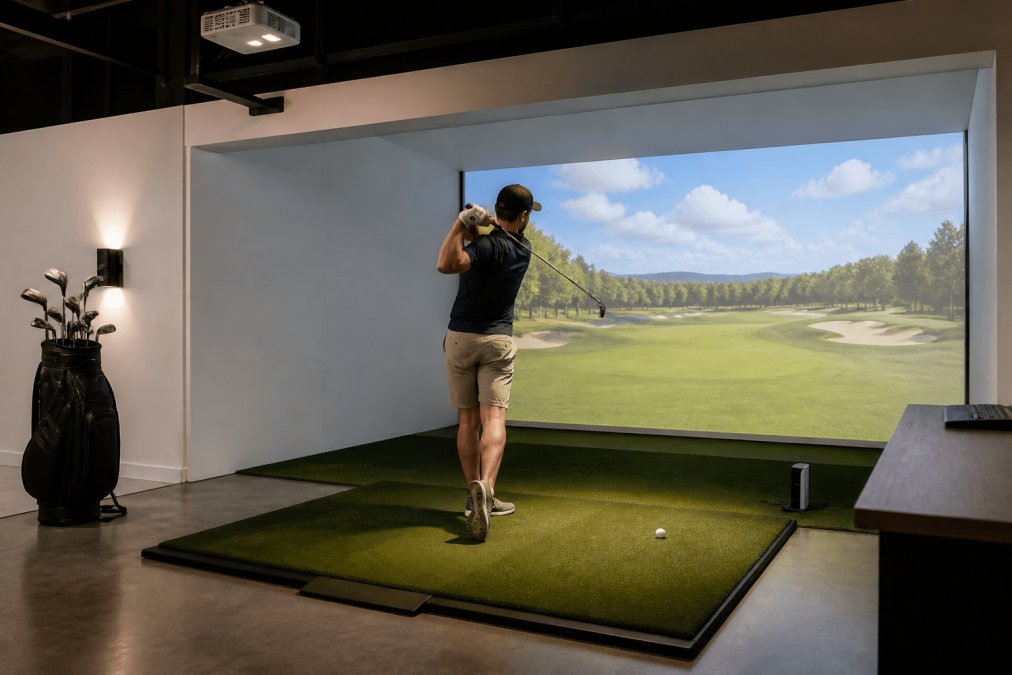
professional turf maintenance.
The impact screen absorbs ball strikes and displays the virtual course. Standard impact screens handle ball impacts well but can show creasing over time. Premium screens like those in the SimBooth kits feature crease-free engineering, maintaining sharp visuals across thousands of shots. The Vanish Series Retractable Golf Enclosure at $2,999 rolls up when not in use, transforming a dedicated golf bay back into open space.

For permanent installations, the Modular Golf Simulator Bay Enclosure at $6,850 uses high-density padded panels that reduce bounce-back and noise while creating a professional appearance. Enclosure size matters significantly. Most commercial installations assume 11-12 feet of ceiling height to accommodate full swings without restriction.
Projection brightness, measured in lumens, determines image visibility in ambient light. A projector at 5,000+ lumens handles venues with overhead lighting or windows (ies.org). Short-throw projectors mount close to the impact screen, reducing shadow interference from the golfer. The BenQ AK700ST 4K laser projector in premium packages delivers exceptional brightness and color accuracy.
Projection latency, the delay between a swing and the on-screen response, matters for user experience. Modern commercial-grade projectors introduce minimal latency, typically under 50 milliseconds.
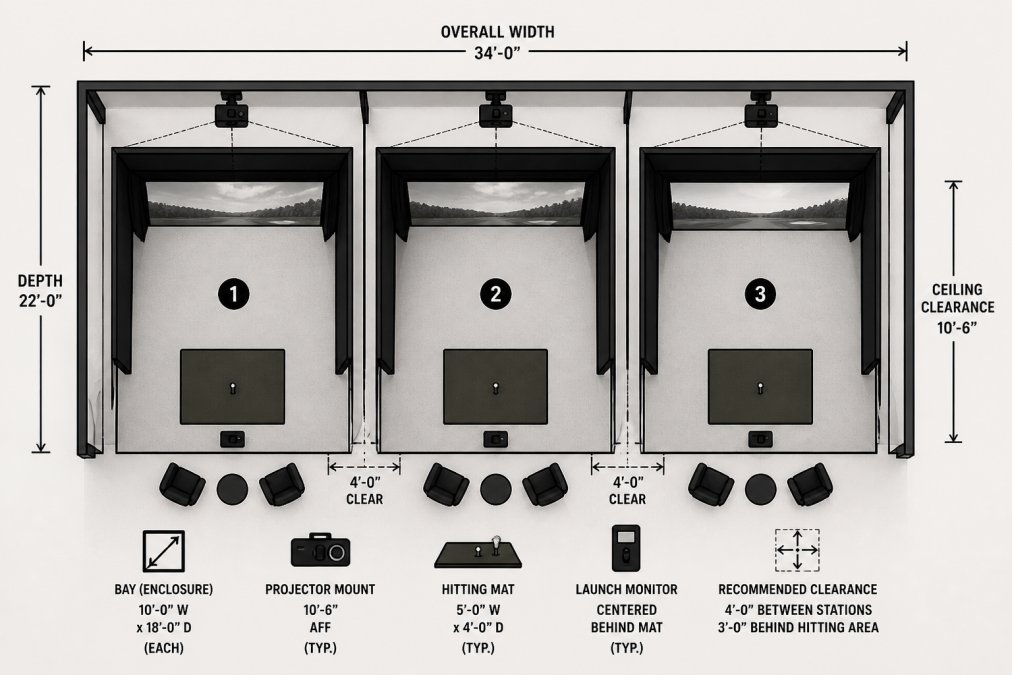
Before committing to a turnkey solution, understand your actual space constraints.
Minimum space requirements:
The SimBooth Kit 2 footprint of 12'1" x 12' x 8'10" fits standard commercial spaces but requires careful planning around existing infrastructure. Many commercial operators overlook permitting and zoning. Depending on your jurisdiction and venue type, adding golf simulators may trigger building code reviews or electrical inspections. Check with your local permitting office before finalizing your space plan.

Acoustic planning also matters. A golf simulator bay can generate significant noise. Venues in shared buildings should budget for acoustic treatment: foam panels, sound-dampening mats, or strategic enclosure placement away from shared walls.
Turnkey solutions simplify installation but don't eliminate maintenance. A well-maintained system operates reliably for years.
Maintenance Task |
Frequency |
Impact |
|---|---|---|
Launch monitor calibration check |
Monthly |
Ensures accurate ball/club data |
Impact screen inspection |
Monthly |
Detects creasing, tears, or damage early |
Projector lens cleaning |
Quarterly |
Maintains image brightness and clarity |
Hitting mat replacement |
18-24 months |
Prevents uneven surfaces and joint strain |
Software updates |
As released |
Fixes bugs, adds courses, improves stability |
Enclosure structural inspection |
Quarterly |
Catches loose panels or mounting issues |
Electrical system check |
Annually |
Prevents power issues or safety hazards |
Launch monitor calibration is non-negotiable for instruction venues. Even minor drift in measurements erodes instructor credibility. Most commercial systems require recalibration every 6-12 months, depending on usage intensity.
Hitting mats wear faster than many operators anticipate. Under heavy use (8+ hours daily), a commercial-grade mat lasts 18-24 months before showing uneven wear. Budget for replacement as a regular operating expense.
Software licensing varies by package. The RSG Pro includes lifetime software access with no annual fees. The SimBooth kits include 1-year GSPro subscriptions, after which annual renewal becomes a cost line item. Understand your venue's long-term software costs before choosing a package.
Commercial equipment maintenance best practices
Selecting a commercial golf simulator turnkey solution requires matching your venue type, space constraints, budget, and revenue model to a specific package.
For sports bars and entertainment venues: The Red Stakes Golf RSG Pro at $12,249.99 balances cost and capability. Casual players don't need tournament-grade accuracy, and the lifetime software access eliminates recurring licensing costs.
For golf academies and instruction facilities: The SimBooth Kit 2 or Apogee package prioritizes launch monitor accuracy and professional presentation. Instructors need reliable data, and students expect a polished environment.
For resort and hospitality properties: The Apogee package at $22,699 with multi-sport capability appeals to guests seeking premium entertainment. The TruGolf Multiplay feature differentiates the property from competitors.
For budget-conscious venues testing the market: The ProTee VX at $10,353.61 offers 4K laser projection and overhead camera technology at entry-level pricing.
Total Golf Simulators offers a Simulator Finder Quiz that matches your specific space, budget, and goals to the right package. Before finalizing your choice, verify that the vendor provides clear documentation on installation timelines, power requirements, network specifications, and post-sale support.
Commercial golf simulator turnkey solutions have matured into viable revenue generators for venues willing to operate them strategically. The technology works. The profitability works. What separates successful installations from failures is choosing a package matched to your specific venue, understanding your operational costs, and committing to maintenance discipline.
Total Golf Simulators offers multiple turnkey packages designed for different venue types and budgets, backed by expert guidance on space planning, installation, and long-term support. Our Price Match Guarantee ensures you're not overpaying, and our free shipping on most items removes hidden costs from your decision. Shop Golf Simulators today and transform your venue into a year-round revenue generator.
A: Commercial golf simulator turnkey solutions range from $10,000 to $23,000 depending on components. Entry-level packages like the Red Stakes Golf RSG Pro start at $12,249.99 and include a launch monitor, enclosure, hitting mat, and projector. Premium options like the Apogee package reach $22,699.00 with advanced camera technology and multi-sport capabilities. Most turnkey solutions include professional-grade hardware designed for high-volume commercial use and come with software and warranty coverage.
A: Golf simulator ROI for businesses depends on venue type and pricing model. Sports bars and entertainment centers typically charge $30–$60 per hour per bay, generating $240–$480 daily per simulator with 8–10 hours of operation. Membership models at golf instruction facilities can produce consistent revenue. Hidden costs include software subscriptions, annual maintenance ($500–$1,500 per unit), staff training, and consumable replenishment. Most venues break even within 18–24 months when operating at 50% capacity or higher.
A: A commercial golf simulator maintenance checklist should include monthly calibration checks on the launch monitor, weekly cleaning of the impact screen and projector lens, quarterly inspection of the hitting mat for wear, and annual professional servicing of all components. Most manufacturers recommend consumable replenishment every 12–18 months, including impact screen resurfacing or replacement. Establish a log for all maintenance and keep support contacts on file. Many turnkey providers offer service agreements that cover preventive maintenance and parts replacement.
A: Yes. Commercial golf simulator installations may require building permits, electrical inspections, and zoning approval depending on your location and venue type. Check with your local building department about ceiling height requirements, electrical load capacity, and safety codes. Some jurisdictions classify simulators as entertainment equipment requiring specific licensing. Hotels and resorts should verify that installations comply with ADA accessibility standards. Professional site assessment from your equipment provider can identify permitting requirements early in the planning process.
This article was written using GrandRanker