
Customer Svc: 855-620-2330 -
M-Sat -9am-6pm
Speak To Customer Service - 855-620-2330 - M-Sat 9:00am - 6:00pm MST
Customer Svc: 855-620-2330 -
M-Sat -9am-6pm
Speak To Customer Service - 855-620-2330 - M-Sat 9:00am - 6:00pm MST

Last Updated: September 28, 2026
The foundation of any golf simulator setup starts with one critical calculation: throw distance and throw ratio. These two metrics determine whether your projector will fit your space and deliver the image size you need.

Throw ratio is the relationship between the distance from the projector to the screen and the width of the image it produces. A short-throw projector has a ratio below 0.5:1, meaning it can project a 100-inch image from just 3-5 feet away. This matters enormously in residential setups where space is tight.
For example, the Optoma Golf Simulator Short Throw Projector ZW350ST features a 0.496:1 throw ratio, allowing you to project a large image in confined spaces like basements or spare bedrooms. Without understanding throw ratio, you might buy a standard projector that requires 15-20 feet of distance, a setup killer for most home environments.
The relationship is straightforward: multiply the screen width by the throw ratio to determine how far back the projector must sit. A 10-foot-wide screen with a 0.5:1 ratio needs the projector about 5 feet away. Get this wrong, and you're either projecting onto a wall or mounting the projector so far back that it dominates your room.
At Total Golf Simulators, we help customers match projectors to their actual space constraints. We recommend calculating throw distance before making any purchase.
A throw distance calculator removes guesswork, but understanding the underlying math ensures you catch errors and make confident decisions. Most users benefit from both a calculator and a quick manual check.
The Core Formula
Throw distance = Screen width × Throw ratio
If your screen is 10 feet wide and your projector has a 0.5:1 throw ratio, the projector must sit 5 feet from the screen. If you only have 4 feet of depth, that projector won't work, you need a ratio below 0.4:1.
Manufacturers provide calculators on product pages, but they often require you to know your desired screen size first. Many users don't. A better approach: measure your available depth, then work backward to find the maximum screen width your space can accommodate.
Working Backward: Space-First Approach
Instead of choosing a screen size and finding a projector, start with your constraints:
Example: You have 6 feet of depth and want a 10-foot screen. Required throw ratio = 6 ÷ 10 = 0.6:1. Any projector with a 0.6:1 ratio or shorter will work. The Optoma ZW350ST (0.496:1) exceeds this requirement, so it fits. The GT2000HDR (0.55:1) also works. A standard projector with a 1.5:1 ratio would not.
Quick Compatibility Matrix for Common Setups
These combinations represent typical home simulator configurations:
Available Depth |
Desired Screen Width |
Required Throw Ratio |
Suitable Projectors |
|---|---|---|---|
4 feet |
8 feet |
0.5:1 or shorter |
ZW350ST (0.496:1), short-throw models |
5 feet |
10 feet |
0.5:1 or shorter |
ZW350ST, short-throw models |
6 feet |
10 feet |
0.6:1 or shorter |
ZW350ST, GT2000HDR (0.55:1) |
8 feet |
12 feet |
0.67:1 or shorter |
GT2000HDR, UHZ35ST (0.61:1) |
10+ feet |
12+ feet |
0.83:1 or longer |
Standard or long-throw projectors |
This matrix handles many residential setups. If your space falls outside these ranges, use the formula above or consult a manufacturer's calculator.
Common Mistakes to Avoid
Mistake 1: Forgetting to account for projector depth. The projector itself takes up 6-12 inches of space. If you measure 5 feet from the hitting area to the wall, subtract the projector depth. You actually have 4.5-4 feet of throw distance. Recalculate with the adjusted number.
Mistake 2: Confusing throw ratio with throw distance. Throw ratio is a proportion (0.5:1); throw distance is a measurement in feet. Always multiply screen width by throw ratio to get distance.
Mistake 3: Ignoring ceiling height. A short-throw projector mounted 4 feet from the screen still needs ceiling clearance. Ensure your ceiling is at least 9 feet high and that the projector won't interfere with your swing path. Measure from the floor to the bottom of the projector when mounted.
Using Manufacturer Calculators Effectively
Most projector manufacturers (Optoma, BenQ, Epson) provide online throw calculators. These are accurate but require you to input screen width first. Use them as a verification step after you've done the backward math:
This two-step process catches errors. If the calculator shows a throw distance longer than your available space, the projector won't work, even if the ratio seemed close.
Optoma Golf Simulator Short Throw →
When to Consult a Professional
If your space is irregular (angled ceiling, structural obstacles, limited height), or if you're installing in a commercial venue, consult a golf simulator installer. They can account for factors calculators miss, electrical outlet placement, ventilation, swing clearance around obstacles, and optimal screen height for your eye level.

Impact screens demand brightness. Unlike traditional projection screens that reflect light, impact screens are engineered to absorb the energy from golf balls while maintaining image clarity. This design requires a projector with sufficient lumens to overcome the screen's absorption characteristics.
Most impact screens have a gain rating between 0.8 and 1.1. A projector with 3,000 lumens works adequately in a dark room but struggles in spaces with windows or ambient lighting. For realistic golf simulation, aim for at least 3,500 lumens.
The Optoma Golf Simulator Projector GT2000HDR delivers 3,500 lumens with full 1080p resolution, providing bright, vibrant images even when some ambient light is present. This brightness level handles both bright mornings and evening sessions without requiring complete darkness.
Higher-end setups like the Optoma UHZ35ST push to 3,500 lumens with 4K resolution, giving you sharper detail alongside brightness. For commercial venues or rooms with significant natural light, the BenQ LK936ST reaches 5,100 lumens, ensuring the image remains crisp and clear regardless of ambient conditions.

Aspect ratio determines how the image stretches across your screen. Golf simulator software typically runs at 16:9 (widescreen) or 4:3 (standard). Mismatching your projector's native resolution to your software creates distorted images or wasted screen space.
Most modern golf simulator software uses 16:9 aspect ratio. Your projector should support this natively. Native resolution means the projector's actual pixel layout matches the software's output, eliminating scaling that degrades image quality.
WXGA resolution (1280 x 800) and Full HD 1080p (1920 x 1080) both support 16:9 natively. The ZW350ST projects WXGA, while the GT2000HDR delivers Full HD. Both work seamlessly with standard golf simulator software.
4K projectors like the UHZ35ST (3840 x 2160) also support 16:9 without issue. The software scales to fill the higher pixel density, resulting in sharper, more detailed images. When choosing a projector for golf simulator projector and screen compatibility, verify that the projector's native resolution supports your software's aspect ratio. Mismatched aspect ratios cause black bars, stretched images, or software errors that ruin the experience.
Impact screen material directly affects how much light the projector must produce. The material composition determines gain (light reflection), durability, and image quality.
Most impact screens use vinyl-based materials engineered to absorb ball impact while maintaining image clarity. These screens typically have a gain between 0.8 and 1.0.
Thicker, more durable screen materials often have lower gain ratings. Lighter screens with gain ratings closer to 1.0 work with 3,000-3,500 lumen projectors.
The relationship is inverse: lower gain requires higher lumens. When selecting golf simulator projector and screen compatibility, match your screen's gain specification to your projector's brightness output. A mismatch results in either wasted brightness (oversized projector for the screen) or dim, unsatisfying images (undersized projector for the screen).
Projector placement determines whether your setup works or fails. Ceiling-mounted projectors are standard for golf simulators, positioned above and behind the hitting area to project forward onto the impact screen.
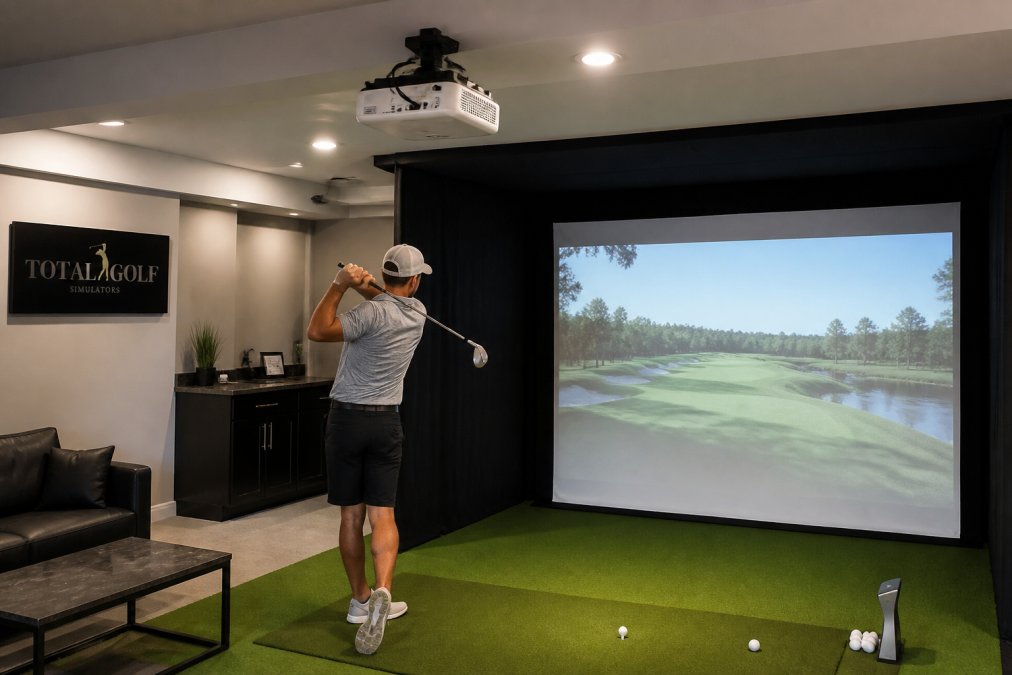
Minimum ceiling height for a golf simulator is typically 9 feet.
Golf simulators run continuously in environments that accumulate dust. Hitting mats shed fibers, air circulation spreads particles, and enclosures trap dust near the projector. Regular maintenance prevents image degradation and extends projector life.
Throw ratio is the distance the projector must sit from the screen divided by the screen width. Most golf simulator projectors use short-throw ratios (0.496:1 or lower) to fit tight spaces. Use a throw distance calculator by entering your available distance from screen and desired screen size. For example, the Optoma GT2000HDR projects a 100-inch image from just 3.5 feet away. This calculation ensures your projector and screen are physically compatible before purchase.
Yes significantly. Impact screen material determines how much light the projector reflects back and how evenly that light distributes across the image. For golf simulators, match your projector's lumens to the screen gain: 3,500+ lumens works well with standard 1.0-gain impact screens, while 5,100+ lumens handles well-lit rooms with any screen type.
No. Golf simulators require impact-resistant screens that withstand golf ball strikes without tearing or losing image quality. Standard projection screens will fail immediately. Impact screens are engineered with durable mesh or vinyl backing specifically for this purpose. Additionally, the screen's aspect ratio (typically 16:9 or 4:3) must match your launch monitor and simulator software output, or the image will display with black bars or distortion. Always verify compatibility with your specific simulator software before purchasing.
Aim for at least 3,500 lumens for rooms with ambient light or windows. The Optoma GT2000HDR delivers 3,500 lumens and works well in moderately lit spaces. For very bright rooms or full-time commercial venues, consider 5,100+ lumens like the BenQ LK936ST. Brightness compensates for ambient light washing out the projected image, which is critical for seeing ball flight and course detail. Pairing adequate lumens with the right impact screen material ensures consistent visibility throughout the day.