
Customer Svc: 855-620-2330 -
M-Sat -9am-6pm
Speak To Customer Service - 855-620-2330 - M-Sat 9:00am - 6:00pm MST
Customer Svc: 855-620-2330 -
M-Sat -9am-6pm
Speak To Customer Service - 855-620-2330 - M-Sat 9:00am - 6:00pm MST

Last Updated: September 24, 2026
A launch monitor is the measurement device at the heart of any indoor golf setup: it tracks what your club and ball do at impact, then feeds that data to simulation software so the shot on screen matches the shot you hit. At Total Golf Simulators, we've watched this single component make or break an entire build. Get it right and your basement becomes a legitimate practice facility; get it wrong and you've bought an expensive video game.
The distinction matters more than most buyers realize. A launch monitor doesn't simulate anything on its own. It measures. The software simulates. If the measurement is weak, no amount of photorealistic graphics will save the experience, a point the USGA's research on launch conditions and ball flight makes clear when it explains how spin and launch angle dictate trajectory.
Here's the part most buyers skip: the launch monitor is the most upgrade-sensitive piece of the puzzle. Enclosures, mats, and projectors stay put for years; launch monitors get replaced when expectations rise.
The two dominant technologies solve the same problem differently, and your room decides which one wins. Radar units track the club and ball through the hitting zone using Doppler radar, so they need space behind and in front of the ball to read flight. Photometric units use high-speed cameras to capture impact, so they care far more about lighting and camera sightlines than depth.
That difference drives most buyer regret. A golfer with a tight basement buys a radar unit, discovers it needs roughly eight feet of ball flight to read spin properly, and ends up with unreliable numbers. A golfer with a cavernous garage buys a camera unit, mounts it near a window, and fights glare all winter.
What most guides miss is that "radar vs camera" isn't a quality question, both produce tour-level accuracy when set up correctly. It's a room, lighting, and budget question. Answer those three honestly and the choice makes itself.
Space requirements are where home simulator projects live or die, and ceiling height sinks the most builds. A full swing needs clearance for the club at the top, generally at least nine to ten feet for most adult golfers, more for taller players. Depth and width matter too, but a low ceiling is the one problem you usually can't fix.
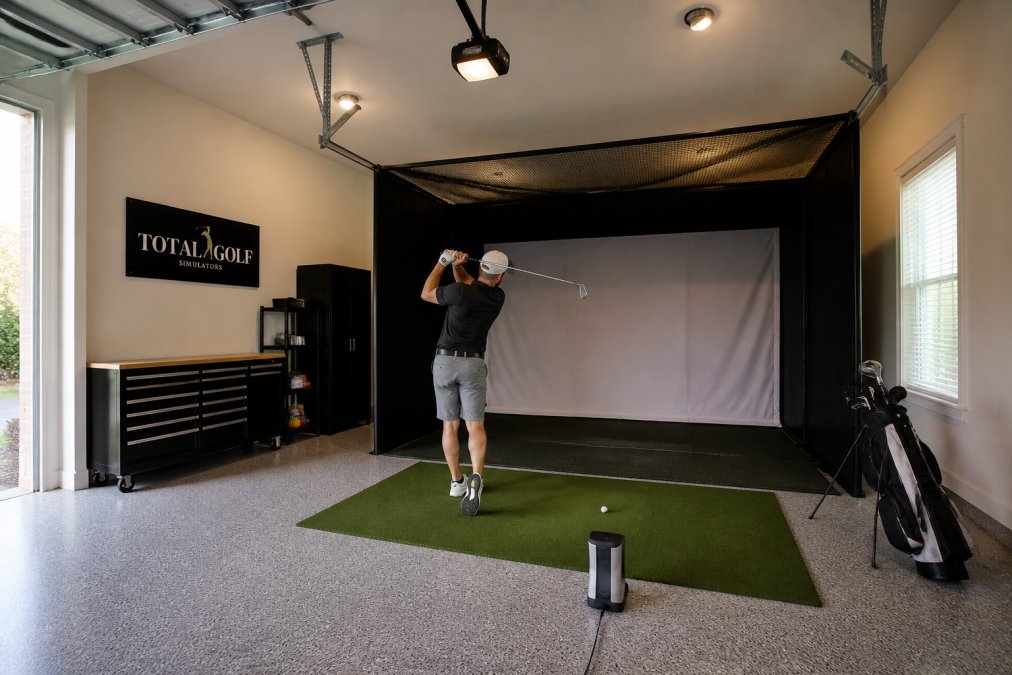
The practical breakdown looks like this:
Requirement |
Typical Minimum |
Why It Matters |
|---|---|---|
Ceiling height |
9-10 ft |
Clearance for full swing |
Room depth |
12-15 ft |
Ball flight for radar tracking |
Room width |
10-12 ft |
Comfortable stance and screen width |
Hitting area |
8-10 ft |
Space behind ball for the monitor |
If your space falls short, the fix is usually a camera-based unit, a shorter backswing for practice, or a different room. Total Golf Simulators offers a Simulator Finder Quiz specifically to match a setup to your actual dimensions before you spend anything. Our team would rather talk you out of the wrong room than sell you equipment that never performs.
Budget doesn't mean compromised anymore, but it does mean choosing trade-offs carefully. The sub-$1,000 tier splits into three bands, and knowing which one you're shopping in prevents the most common upgrade regret.
TruGolf Apogee Indoor Launch Monitor →
The entry band (roughly $200-$500) is where portable, radar-based personal units live.
Band |
Typical Price |
Spin Accuracy Indoors |
Best For |
|---|---|---|---|
Entry |
$200-$500 |
Limited (no spin axis) |
Tempo, gapping, speed training |
Mid |
$500-$700 |
Moderate (needs depth) |
All-around home practice |
Upper |
$700-$1,000 |
Strong (camera-assisted) |
Serious indoor simulation |
More data isn't better data. The metrics that improve your game tie to a cause you can actually change. Ball speed and club head speed tell you about power. Launch angle, back spin, and side spin explain why the ball flies the way it does. Smash factor, the ratio of ball speed to club head speed, tells you how efficiently you transfer energy at impact.
Platform |
Typical Access Model |
Notes |
|---|---|---|
E6 Connect |
Bundled tier + paid course packs |
Widely supported across radar and camera units |
GSPro |
Annual subscription |
Popular for its course library and graphics; strong third-party support |
TGC 2019 |
One-time license (legacy) |
Older platform; support varies by device |
Awesome Golf |
Subscription |
Practice-focused; strong data visualization |
Manufacturer-native apps |
Usually free with device |
Feature depth varies widely |
Cost Type |
One-Time |
Recurring |
|---|---|---|
Launch monitor hardware |
Yes |
No |
Course library |
Sometimes bundled |
Often subscription |
Simulator software |
Sometimes bundled |
Sometimes subscription |
Advanced features/AI coaching |
Rarely |
Usually subscription |
Cloud storage/video |
Rarely |
Usually subscription |
The FTC's guidance on negative option and subscription billing is worth reading if you're signing up for any recurring simulator service, since auto-renewal terms vary widely and cancellation windows are not always obvious.
Accuracy drifts, and the devices that stay accurate are the ones that get maintained. Camera-based units need clean lenses and consistent lighting, a smudged lens or new light source can throw off readings without warning. Radar units need a clear, unobstructed path to the ball and a stable mounting position.
The hardest part of building a home simulator isn't picking a launch monitor. It's matching that device to your actual room, budget, and practice goals, and most buyers get the order backwards.
The right launch monitor depends on your space, budget, and goals. The TruGolf Apogee ($7,995) uses dual high-speed cameras for measured club and ball data with no lag, ideal for dedicated home or commercial bays. The Uneekor Eye Mini ($2,999) is portable and captures 19 data points. The FlightScope Mevo+ ($2,339) uses radar and works well in garages. For tighter budgets, the Garmin Approach R10 ($599) tracks over a dozen metrics and records video clips.
Yes, a launch monitor is the core sensor of any simulator. It measures ball speed, launch angle, spin rate, and club data, then sends that information to simulator software to render ball flight on screen. Without one, you have a screen and projector but no way to track shots. Every simulator build needs some form of launch monitor, whether a budget radar unit or a camera-based system.
Radar launch monitors track ball flight using Doppler radar, which requires more depth behind the ball and works well outdoors or in larger rooms. Camera-based units use high-speed imaging to capture impact directly, often producing more accurate spin and club data in tight indoor spaces. The radar vs camera launch monitor decision usually comes down to room depth and whether you need precise club path and face angle data.
For golfers who want year-round practice and measurable feedback, a launch monitor pays off quickly. You get data on club head speed, ball speed, smash factor, and shot dispersion that range sessions alone cannot provide. A budget option like the Garmin Approach R10 ($599) delivers over a dozen metrics and video clips. Serious players and instructors benefit most from camera-based systems with full club data.