
Customer Svc: 855-620-2330 -
M-Sat -9am-6pm
Speak To Customer Service - 855-620-2330 - M-Sat 9:00am - 6:00pm MST
Customer Svc: 855-620-2330 -
M-Sat -9am-6pm
Speak To Customer Service - 855-620-2330 - M-Sat 9:00am - 6:00pm MST

Last Updated: October 29, 2026
Quick Summary
To choose a golf simulator for left handed golfer, start by picking an overhead launch monitor, which keeps the hitting zone clear and avoids repositioning when players switch sides. Then confirm the unit tracks left-handed swings, and measure your ceiling height, room width, and follow-through clearance on both sides of the ball.
Left-handed golfers face a real problem when they shop for a home simulator. Most systems are set up around right-handed swings, so a lefty can end up with a bay that feels awkward or tracks poorly. The right choice starts with planning for your swing direction before you buy anything.
A golf simulator for left handed golfer is not a different product. It is the same system configured for how you swing. The differences show up in launch monitor placement, hitting area layout, and how easily the bay works for a mixed-handed group. Planning these early saves money and frustration later.
Here is a practical path, step by step. Each step narrows the choice until you have a setup that fits your room and your swing.
The launch monitor is the heart of the system, and where it sits matters. Overhead units mount to the ceiling in front of the hitting area. Floor- or side-mounted units sit on or beside the mat.
Overhead monitors keep the hitting zone clear of hardware. For a lefty, that matters because the unit does not need to be repositioned when someone changes sides.
Overhead launch monitors are a strong fit for mixed-handed play. Verify the stated hitting zone and mounting height against the manufacturer's specs before you commit, since those numbers decide whether your room works.
Ask the seller directly whether the unit has been validated for left-handed tracking, and check the product listing for handedness details.
Our current overhead options include the following, with prices as listed:
Launch Monitor |
Type |
Price (USD) |
Notes |
|---|---|---|---|
Red Stakes Golf RSG Pro |
Overhead |
$6,999.99 |
Dual high-speed cameras, free RSG CLUB software |
Uneekor Eye XO |
Overhead |
$7,999.00 |
Over 20 metrics, works with GSPro and E6 Connect |
ProTee VX |
Overhead |
$6,500.00 |
Marker-free club tracking, large hitting zone |
Uneekor Eye XO2 |
Overhead |
$10,999.00 |
24 data points, optional "All In" package adds $1,400.00 |
The ProTee VX and Red Stakes RSG Pro both state that their hitting zones accommodate lefties and righties without repositioning the unit. For another overhead-style option to compare, see the Flightscope Mevo launch monitor. The RSG PRO lists a mounting height of 8'9" to 10'6" above the hitting surface. Confirm that your ceiling falls in that range before you order.
Measure before you shop, and write the numbers down. Our room dimension requirements guide lists the detailed dimensions needed to check whether your space fits a simulator. You need four measurements: ceiling height at the hitting position, room width wall to wall, room depth from the screen to the back wall, and the distance from the ball line to the launch monitor. Check the stated mounting-height range and hitting-zone size for the unit you are considering to assess whether it fits your room.
Ask the seller for the stated hitting-zone dimensions and confirm the left-handed ball position falls inside them without moving the hardware.
Red Stakes Golf RSG Pro Overhead Indoor Launch Monitor - w/free RSG Software →
A common workable pattern in a room with a 9-foot ceiling and roughly 12 feet of width is a centered ball line with the mat wide enough for both stances, an overhead monitor mounted in front of the ball within its stated height range, and clear follow-through space on both sides. In a narrower room, shift the ball line toward one wall only if the monitor's hitting zone still covers both stances, otherwise the left-handed player ends up outside the window. If the numbers feel tight after you sketch them, a smaller unit or a different room is the cheaper fix than rebuilding the bay later.
The goal is a setup where a left-handed player and a right-handed player can alternate without moving the monitor, the mat, or the screen.
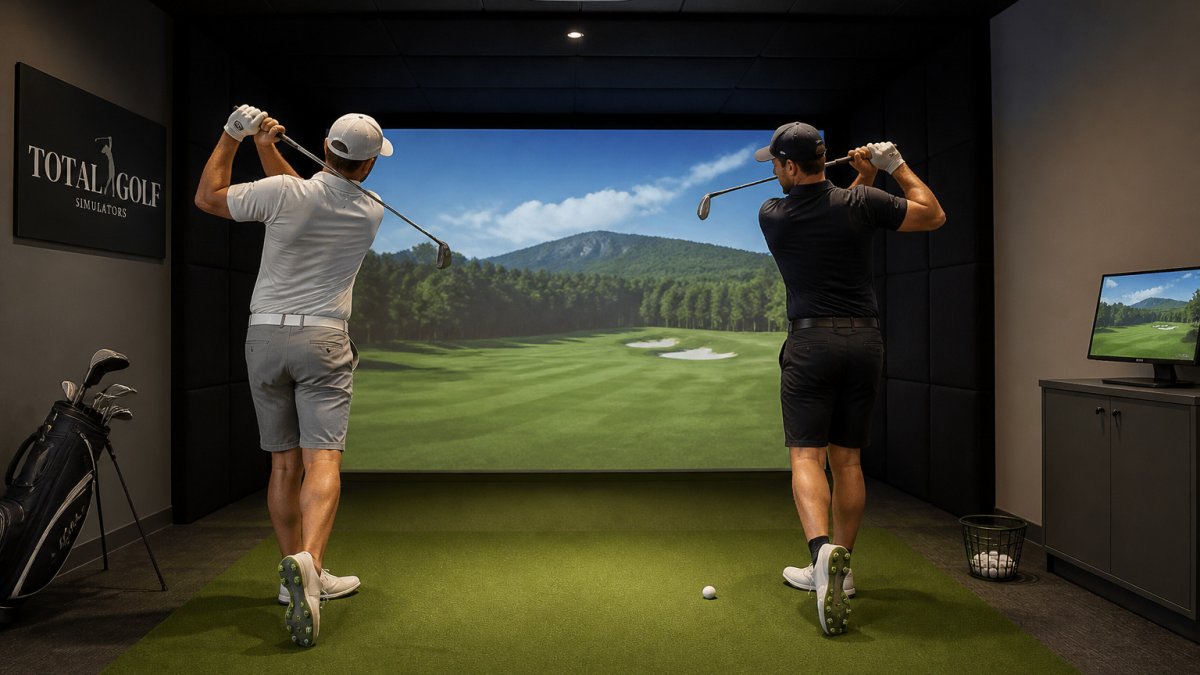
With a floor- or side-mounted monitor, switching usually means repositioning the unit or accepting a narrower window on one side. That is the trade-off to price in. If your group is genuinely mixed, an overhead unit removes a physical step every time someone changes sides.
Position the mat so both players stand on it without stepping off the edge. A mat wide enough for a left-handed stance on one side of the ball line and a right-handed stance on the other keeps both players on the same surface.
Stand the left-handed player in position, then the right-handed player, and confirm the monitor reads both swings from the same mounted spot without moving hardware. If both read cleanly, the layout is done. If one side reads poorly, adjust the mat and the ball line before you touch the monitor, the mat is the cheaper variable.
The Red Stakes RSG CLUB software is included with lifetime access, but the online multiplayer mode costs $199 per year. The Uneekor Eye XO2 "All In" package adds $1,400.00 for two Swing Optix cameras and a pressure-sensing mat.
Think in tiers. The entry overhead options sit in the $6,500 to $8,000 range, while the Eye XO2 starts at $10,999.00. Pick the tier that matches how often you will play and how much swing data you need.
Choosing a golf simulator for left handed golfer comes down to checking monitor placement and measured room clearance. Work through those steps with your room dimensions in hand, then compare the overhead options above.
Total Golf Simulators offers a Simulator Finder Quiz to match setups to your space and budget, plus expert guidance for home and commercial environments. Our Price Match Guarantee and free shipping on most items apply to the products listed here. When you are ready, shop the full range of golf simulators.
Confirm the specific model tracks left-handed club data before buying, and plan a hitting area wide enough for both stances.
Check the product listing or ask the seller whether the launch monitor supports the handedness and hitting position you need.
Plan for enough width to swing comfortably on either side of the hitting mat, plus clearance behind the golfer for the backswing. The Red Stakes Golf RSG Pro lists a mounting height of 8 feet 9 inches to 10 feet 6 inches above the hitting surface, so check the mounting requirements for the specific model you are considering. Measure ceiling height first.
Check the product listing or ask the seller whether the launch monitor supports both handednesses and whether its hitting zone fits your planned layout. Keep enough room that either player can swing without hitting walls or equipment.
