
Customer Svc: 855-620-2330 -
M-Sat -9am-6pm
Speak To Customer Service - 855-620-2330 - M-Sat 9:00am - 6:00pm MST
Customer Svc: 855-620-2330 -
M-Sat -9am-6pm
Speak To Customer Service - 855-620-2330 - M-Sat 9:00am - 6:00pm MST

Last Updated: September 20, 2026
Realistic ball flight in a simulator requires three things working together: accurate measurement, fast processing, and a display that doesn't break the illusion. When one fails, it feels like a video game instead of practice.
This guide from Total Golf Simulators breaks down the equipment that determines whether your indoor shots behave like outdoor shots, which specs matter, and how to match components into one system.
Realistic ball flight is how faithfully a simulated shot reproduces the height, curve, distance, and landing behavior of the same shot hit outdoors. It depends on sensor accuracy, latency, and how well the software renders spin and launch data.
Three variables drive that result:
Most buyers focus on the projector and ignore the launch monitor. That's backwards. A great screen can't fix bad data.
Launch monitors split into two tracking families: camera-based (photometric) and radar-based. Cameras capture impact with high-speed imaging; radar tracks the ball and club through the hitting zone using Doppler.
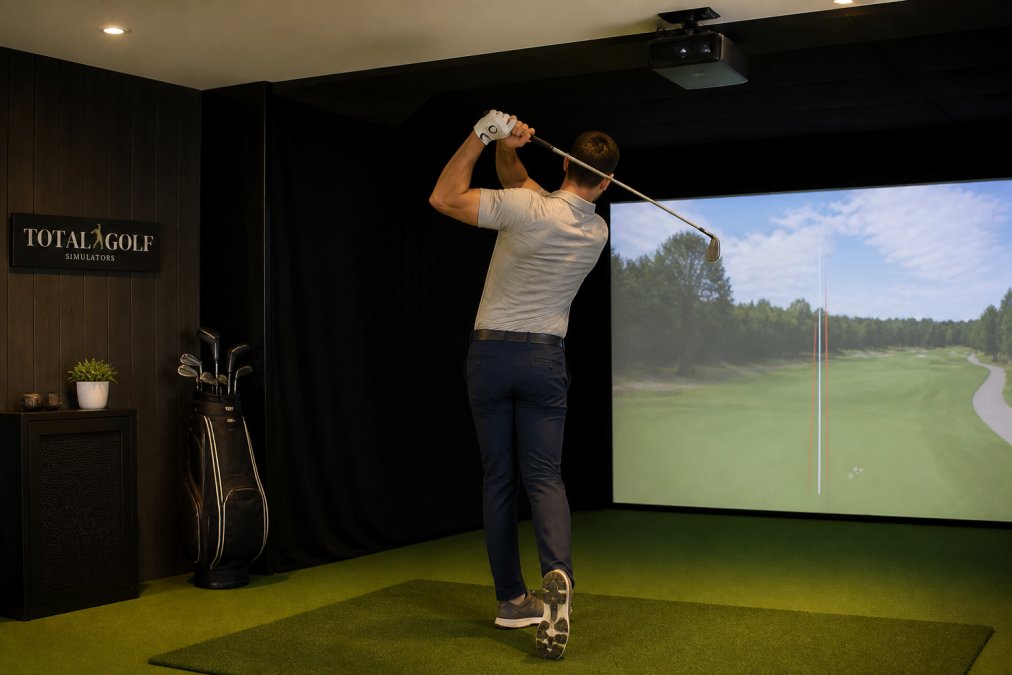
Camera-based units generally win indoors because they measure impact rather than tracking flight over distance. Radar units need runway space behind and in front of the ball, which tight rooms rarely provide.
The trade-off is hitting zone size. Ground-mounted cameras require consistent ball placement, while overhead units like the Uneekor EYE XO2 system overview cover a wider area and keep the floor clear.
The metrics that matter most for realistic ball flight are ball speed, launch angle, spin rate, and spin axis. Everything else is secondary.
Here's how the leading monitors in our catalog compare:
Launch Monitor |
Price |
Tracking |
Data Points |
Best For |
|---|---|---|---|---|
TruGolf Apogee |
$7,995 |
Dual stereoscopic camera |
8 metrics |
Residential and commercial realism |
Uneekor Eye XO2 |
$10,999 |
3-camera overhead |
24 metrics |
Teaching studios and fitting |
$6,500 |
Dual overhead camera |
Ball + club, marker-free |
Permanent home bays |
|
Golf Joy GR2 |
$6,999 |
Dual camera, aluminum body |
Up to 32 metrics |
Serious indoor practice |
Uneekor Eye Mini |
$2,999 |
Dimple Optix portable |
19 metrics |
Portable and range use |
Nvisage NEO-E |
$5,500 |
3-camera optical |
Ball + club |
Flexible indoor/outdoor |
IDRA II |
$6,495 |
Dual stereoscopic overhead |
Ball + club |
Short game and putting |
Golf Joy Spica 3 |
$3,199 |
Triple camera + AI |
27 metrics |
Portable pro-level accuracy |
TruGolf Launch Box |
$3,499 |
Dual high-speed camera |
8 metrics |
Entry-level indoor/outdoor |
Garmin Approach R10 |
$599 |
Radar |
12+ metrics |
Budget portable training |
The right launch monitor matches its tracking technology to your room dimensions and its data depth to your goals. A $10,999 overhead unit is wasted where you can't mount it at the recommended 9 to 10 foot ceiling height.

Start with your space. Then pick the monitor.
For most home buyers, the ProTee VX hits the sweet spot. It captures ball and club data without stickers or marked balls, mounts overhead, and handles left- and right-handed players without repositioning, so you practice with your actual clubs. This level of precision ensures that the data you analyze reflects your true swing mechanics, which is why a custom golf club fitting remains the most effective way to optimize the performance of the equipment you use in your simulator.

One limitation: the ProTee VX is indoor-only.
Golf simulator projector brightness requirements start at roughly 3,000 lumens for a dark, dedicated room. For spaces with ambient light or larger screens, aim for 5,000 lumens or higher.
TruGolf Apogee Indoor Launch Monitor →
Brightness is measured in lumens, and the number you need scales with screen size and room lighting: a 10-foot screen in a windowless basement needs far less output than a 16-foot screen in daylight.
Screen Size |
Dark Room |
Moderate Ambient Light |
Bright Room |
|---|---|---|---|
Up to 10 ft |
3,000 lumens |
3,500 lumens |
5,000 lumens |
10-13 ft |
3,500 lumens |
4,500 lumens |
6,000 lumens |
13-16 ft |
5,000 lumens |
6,000 lumens |
8,000+ lumens |
The best golf simulator impact screen balances image quality against noise and bounce-back. Too thin looks bright but sounds like a drum and lets balls ricochet; too thick fixes both but dims the picture.
Three specs decide the outcome:
Mounting determines whether the image stays clean over time. A fixed frame with a tensioned border holds the screen flat, so wrinkles never develop in the hitting zone; a retractable screen trades flatness for space savings and can develop memory folds where it rolls. For a dedicated bay, fixed tensioned frames win; for a multi-purpose room, retractable reclaims the floor.
For multi-purpose rooms, retractable screens let you reclaim the space.
A simulator is a computer system, and the PC is where most builds quietly fail. Frame rate drops, input lag, and crashes almost always trace back to underpowered or mismatched hardware.
Compatibility is the other half.
Long-term simulator ownership comes down to three things nobody talks about at purchase: how your body feels after an hour, how often you recalibrate, and how loud the whole thing is. These determine whether you still use it a year from now.
Stance width and turf height matter too. A mat that sits higher than your normal lie changes your swing plane, and one that sits lower forces you to reach. Match the mat height to a typical fairway lie so your indoor swing transfers to the course.
Total Golf Simulators provides complete turnkey solutions for both home and commercial environments.
The launch monitor is the foundation. Camera-based units like the TruGolf Apogee measure actual club and ball data with no extrapolated guesses, which is what separates a realistic ball flight simulator from a video game feel. After the launch monitor, projector brightness and screen quality determine whether the visual matches the data. A 3,000-lumen projector in a dark room will look sharper than a 5,000-lumen unit fighting ambient light, so match brightness to your room before upgrading anything else.
Entry-level realism starts around $599 with the Garmin Approach R10, which tracks more than a dozen metrics and records video clips. Mid-tier camera systems like the Uneekor Eye Mini at $2,999 or the Golf Joy Spica 3 at $3,199 deliver 19 to 27 data points. Overhead units such as the Uneekor Eye XO2 at $10,999 or the TruGolf Apogee at $7,995 target commercial-grade accuracy. Budget separately for projector, screen, enclosure, and PC, which often total as much as the launch monitor itself.
Aim for at least 3,000 ANSI lumens in a fully dark room and 4,000 to 5,000 lumens if any ambient light reaches the screen.
A worn or thin mat changes your club's angle of attack and can produce misleading launch data, especially on fat shots. Quality mats with realistic turf density and a forgiving sublayer let the club pass through at a natural depth, so the launch monitor reads what you actually swung. If the mat grabs the clubhead, spin and path numbers drift, and your practice reinforces a swing that will not work on grass. Replace mats showing compacted or shiny wear patches before blaming the launch monitor.
Not necessarily high-end, but you need the right specification for your room. Brightness and native resolution matter more than brand tier. A 3,000-lumen 1080p projector in a light-controlled bay produces a convincing image for most home setups. Step up to 4K or higher lumens only if your room has ambient light, a very large screen, or you run commercial sessions where visual fidelity sells the experience.