
Customer Svc: 855-620-2330 -
M-Sat -9am-6pm
Speak To Customer Service - 855-620-2330 - M-Sat 9:00am - 6:00pm MST
Customer Svc: 855-620-2330 -
M-Sat -9am-6pm
Speak To Customer Service - 855-620-2330 - M-Sat 9:00am - 6:00pm MST

Last Updated: November 4, 2026
Quick Summary
Golf ball type does affect simulator accuracy because every launch monitor measures the ball in front of it, so changing the ball changes the numbers. Real golf balls give the highest data fidelity, while foam and limited-flight balls produce low or inconsistent speed, spin and carry readings. Matching a clean, undamaged ball to your sensor type is what protects simulator accuracy.
The impact of golf ball type on simulator accuracy comes down to one fact: every launch monitor reads the ball in front of it, not the ball you wish you'd hit, and simulator accuracy depends on that ball.
A golfer can spend thousands on a premium radar unit, then feed it range balls with worn covers. The data looks off, and it is easy to blame the hardware.
Here's what most guides get wrong: they treat the launch monitor as the whole system. It isn't. The ball is half the measurement.
Below, we break down how each system reads a ball, which balls suit which hardware, and the settings most owners never touch.
Photometric systems use high-speed cameras to photograph the ball at impact and just after.
The two technologies fail in different ways. Cameras need to see the ball clearly, so color, finish, and markings matter enormously. Radar needs a strong reflective signal, so ball size, density, and cover material matter more.
For a deeper look at how these two families compare, read our radar vs camera launch monitor explained breakdown. If you want the mechanics step by step, our guide on how golf launch monitors work walks through the full tracking chain.
Real golf balls give you real ball flight data. Foam and limited-flight balls give you a rough approximation, and that gap shows up in the metrics a launch monitor reports. The reason is mechanical: a real ball compresses against the face, its dimples generate backspin from the cover and core interaction, and its mass carries genuine aerodynamic lift and drag. A foam ball has neither the mass nor the cover hardness to reproduce that chain, so the launch monitor is measuring a different physical event, not a scaled-down version of the real one.
Mixing ball types mid-session is the single most common way to corrupt a practice trend line, because your dispersion and carry numbers stop being comparable from shot to shot.
Ball Type |
Best For |
Data Fidelity |
Indoor Safety |
|---|---|---|---|
Real premium ball |
Fitting, practice, full simulation |
Highest |
Needs full enclosure |
Limited-flight ball |
Tight spaces, short indoor bays |
Moderate |
Safer than real |
Foam ball |
Kids, casual play, club speed work |
Low |
Very safe |
Photometric systems rely on seeing dimples, markings, and ball shape at impact. Foam balls often have molded or shallow dimples and matte finishes, which reduces the contrast the cameras need to calculate spin, so spin readings degrade first, before speed or launch.
Watch out: a limited-flight ball can look accurate on short irons and then fall apart on driver, because the reduced mass and softer cover distort high-speed readings more than low-speed ones. If you test a non-real ball, test it across the full bag before trusting it.
If your bay is tight enough that you need a limited-flight ball, read our indoor simulator data accuracy guide for the setup adjustments that recover some of the lost fidelity.
Radar units want a ball with a dense core and a clean, reflective cover. A standard tour-style urethane ball is the safest pick for any radar-based system, because it returns a strong signal and spins predictably.
For the best golf balls for TrackMan simulator use, look for three things:
Avoid range balls with hard, slick covers. They read fast and spin light, which flatters your numbers and hides your real miss.
If you're shopping for the hardware itself, browse our launch monitor collection to match a unit to your bay and ball choice.
A scuffed ball lies to your launch monitor. Cuts, dirt, and worn dimples break up airflow and scatter the signal, so spin axis and side spin readings drift.
TruGolf Apogee Indoor Launch Monitor w/Instant Shot Detection & 30 courses →
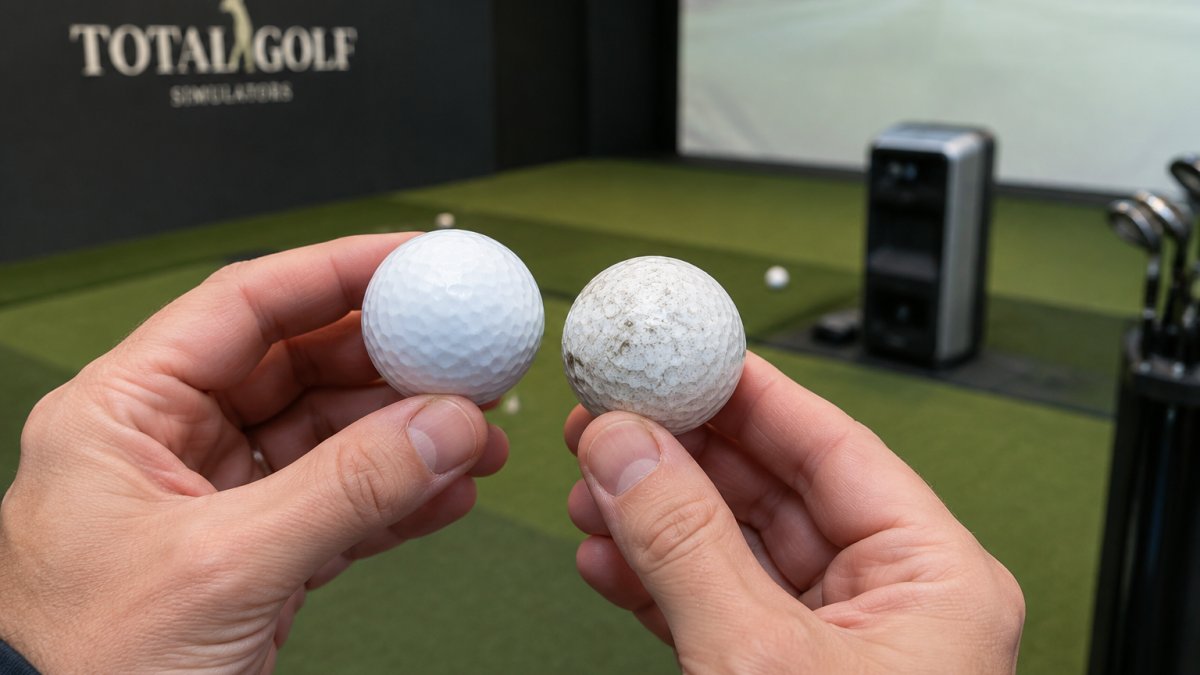
Watch out: a single scuffed ball in a practice session can throw your dispersion pattern off, which may lead you to chase a swing fault that isn't there.
Rotate balls often. Keep a clean batch for data sessions and retire any ball with visible cover damage.
Hardware sets the ceiling on golf simulator launch monitor accuracy. A good unit measures what happens; it cannot invent what it can't see.
Photometric systems struggle with dark or matte balls that lack contrast. Radar systems lose track of balls with weak reflective properties. Neither can fully correct for a dirty, damaged, or wrong-type ball.
What hardware can fix: sensor capture speed, tracking accuracy, and the number of data points recorded. What it can't fix: a ball that gives the sensor nothing to read.
For guidance on units built for tight tolerance, see our picks for the best golf launch monitor for accuracy.
A clean ball is only part of the picture. Ball color, finish, and the software's ball-type setting can change how the sensor interprets what it sees, so aligning those three matters for readings.
Photometric systems calculate spin by comparing consecutive images of the ball and tracking dimple patterns and markings. A glossy white ball gives the camera high contrast against a dark background and clean specular highlights, which makes pattern matching reliable. A matte or colored ball diffuses light instead of reflecting it, so edges soften and the camera has to work harder to lock the pattern, spin readings get noisier first, then launch and speed.
That split is the practical takeaway: if you own a camera-based unit, treat ball finish as a hardware variable. If you own radar, treat cover condition as the variable and stop worrying about color.
Sensor Type |
Best Ball |
Avoid |
Why |
|---|---|---|---|
Photometric |
Glossy white, marked |
Matte, dark, unmarked |
Needs contrast to read spin |
Radar |
Standard urethane |
Foam, limited-flight |
Needs density for signal |
Hybrid |
Standard urethane |
Heavily scuffed balls |
Both systems need clean data |
Watch out: the most common calibration failure is a correct sensor and a wrong software ball profile. The readings look plausible, so nobody checks, and months of practice data quietly reflect the wrong ball model.
For a full walkthrough of calibration and compatibility, read our indoor simulator data accuracy guide.
Match the ball to the sensor, not to your favorite brand, since sensor and ball compatibility drives much of the accuracy experienced.
One honest limitation: no ball choice will make a budget radar unit read spin like a camera system. The ball optimizes what you have; it doesn't upgrade it.
Yes. Photometric systems such as the Uneekor Eye Mini read dimple patterns, so a clean ball with a consistent cover gives steadier spin and ball flight data. Radar systems track the ball through the air, so construction and compression affect carry and spin numbers. Using the same model every session is the simplest way to keep simulator accuracy comparable shot to shot.
They can. Scuffs, embedded dirt and worn dimples change how the ball moves through the air and how cameras read its surface. A ball with damaged dimples may show lower or erratic spin, shorter carry distance and wider dispersion than a clean ball of the same model. Retire any ball with visible cover damage before a practice session so your shot data reflects your swing, not the ball.
Foam and limited-flight balls are made for tight spaces, not for accurate data. Their lower mass and different aerodynamics produce shorter carry distances and spin numbers that do not match a real ball, so most launch monitors will report figures you cannot transfer to the course. Use them only where space or noise rules them in, and treat the readings as directional rather than exact.
Radar-based systems like TrackMan track ball flight, so a standard urethane or ionomer ball with normal compression works well. Whatever you choose, hit the same model repeatedly so your carry distance and dispersion numbers stay comparable.
Getting the ball right is the cheapest accuracy upgrade in your simulator. Total Golf Simulators can help you build the rest of the setup around it, with a Price Match Guarantee, free shipping on most items, and a Simulator Finder Quiz that matches hardware to your space and budget. Get started with Total Golf Simulators and turn every practice session into data you can trust.
