
Customer Svc: 855-620-2330 -
M-Sat -9am-6pm
Speak To Customer Service - 855-620-2330 - M-Sat 9:00am - 6:00pm MST
Customer Svc: 855-620-2330 -
M-Sat -9am-6pm
Speak To Customer Service - 855-620-2330 - M-Sat 9:00am - 6:00pm MST

Last Updated: September 22, 2026
Heavy-duty polyester wins for golf simulator impact screens, and it isn't close. Mesh lets too much light and ball energy pass through, hurting projection clarity and sound dampening. This guide breaks down how to choose the right impact screen material for your space, budget, and projector.

A tighter weave absorbs more impact energy, reducing bounceback. Loose weaves let the ball push deeper before rebounding, and that stored energy returns with force.
Three weave factors matter most:
Triple-layer fabric is the better choice for anyone hitting real golf balls at full speed. Single-layer costs less and suits light use, but wears faster under repeated impact.
Construction |
Best For |
Image Quality |
Durability |
|---|---|---|---|
Single-layer |
Light home use |
Good |
Moderate |
Triple-layer |
Commercial, coaching, heavy use |
Excellent |
High |
Golf simulator screen durability comes down to how well a fabric handles repeated impact without stretching or tearing. Two specs tell most of the story: tensile strength and abrasion resistance.
Impact screens are tested against fast-moving golf balls, and top-tier options are rated for ball speeds up to 250 mph, proof the fabric won't fail under a driver swing.
Sound dampening is where material choice pays off fast. A tightly woven, multi-layer screen absorbs the crack of club-on-ball far better than a thin mesh backstop. Here's what drives the decibel difference, and how to measure it in your own space.
You don't need a lab. A phone sound level meter app (accurate to within a few decibels for comparison) lets you A/B test materials and mounting in the same room on the same day. Measure from a fixed spot, take the peak reading on a driver strike, and run at least five swings per configuration, the crack is what your household hears.
For a basement or garage setup, this is the difference between a setup you can use at night and one your household hears through the floor. Pairing a dense screen with safety netting behind it adds sound and ball containment.
A DIY golf simulator enclosure lives or dies on three things: grommet placement, even tensioning, and a frame that won't flex. Get these right and the screen performs like a professional install.
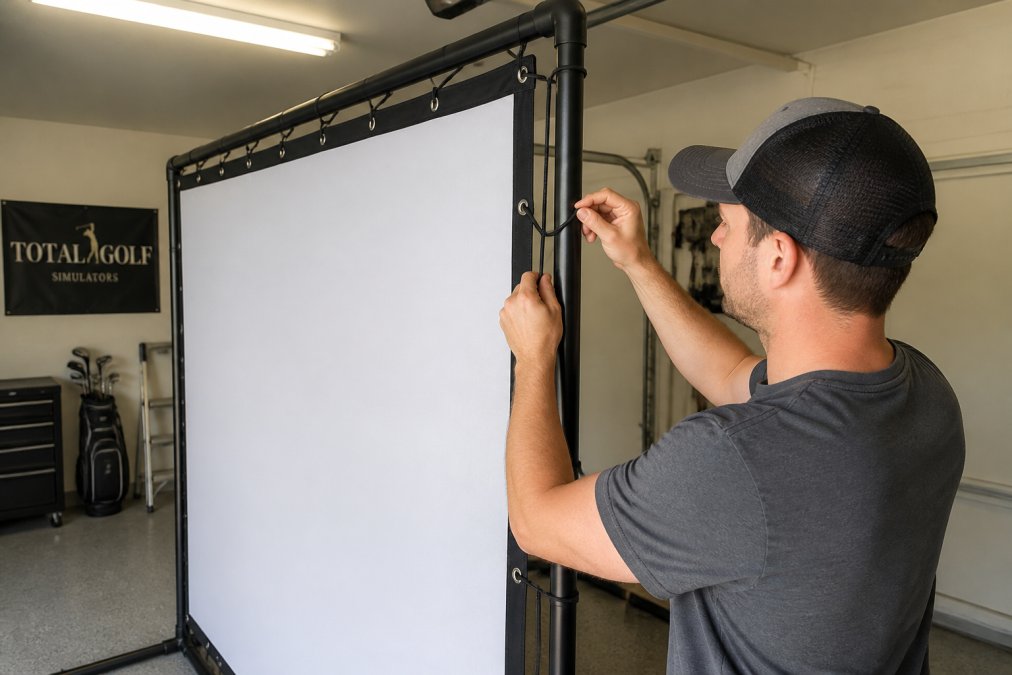
Safety netting goes behind the screen, never in front. It catches balls that punch through or slip past the screen edge, so it needs its own mounting points and a few inches of gap from the screen.
Carl's Place Premium Impact Screen →
Projection clarity depends on matching screen surface to projector output, and specifically on how weave density interacts with your projector's native resolution. A screen that looks great with 1080p can soften a 4K image, and a 4K-tuned screen can look grainy with a low-brightness 1080p unit.
The rule of thumb: the finer the weave, the more detail the surface resolves. A coarse, textured weave acts like a low-pass filter, blurring fine detail before your eye sees it. That's fine for 1080p, but a waste of a 4K projector.
If you can't fully darken the room, a high-contrast gray screen boosts perceived contrast and black levels, so the image looks richer and less washed out, a real upgrade for garages and multi-purpose rooms with windows. Gray screens trade brightness for contrast, though, so pair them with a projector that has lumen headroom: dim projector, muddy image; bright projector, punchy one.

Watch your throw distance too. A grainy texture softens fine detail, so pair a textured screen with a brighter projector and shorter throw to keep the picture crisp. Short-throw and ultra-short-throw projectors are more sensitive to texture than long-throw units because light hits the screen at a steeper angle and picks up more of the weave.
Before you buy, do three things:
Total Golf Simulators carries the Carl's Place Premium Impact Screen, a triple-layer option built for commercial, coaching, and home use. For tighter budgets, the Carl's Place Preferred Golf Impact Screen offers a smoother surface at a lower price, and the Carl's Place High-Contrast Gray Impact Screen is the pick when ambient light is a problem.

Impact screens need almost no maintenance, but the little they do need prevents most premature failures.
Heavy-duty polyester with a tight weave is the most common choice for impact screen material. It handles ball speeds up to 250 mph while keeping the surface smooth enough for a clear projected image. Loosely woven open weave options cost less and work for lower ball speeds, but they produce a grainier picture and wear faster. Multilayer fabric adds durability and reduces bounceback compared to single-layer screens.
Longevity depends on weave tightness, fabric weight, and how often you hit. A tightly woven multilayer screen used in a home setup can last several years of regular practice. Loosely woven screens in commercial settings with high ball volume wear faster. Rotating the screen periodically and keeping ball speed within the rated limit extends its life. Check for sagging or thin spots every few months.
Yes. A smoother, tightly woven surface produces sharper, high-definition projection clarity, while an open weave creates a visible grainy texture that softens the image. Gray screens boost perceived contrast and black levels, which helps in rooms where you cannot fully block ambient light. Match your screen surface to your projector's brightness and throw distance for the best result.
Start with a heavy-duty polyester screen sized to your enclosure, then add grommets along the edges for tensioning. Use bungee cords to attach the screen to a frame, keeping it taut to reduce bounceback and sound. Place safety netting behind the screen as a backstop. Keep the screen at least 8 to 10 feet from the hitting area and verify your projector throw distance before mounting.